Changelogs
View the development history and update records of YoMemo
February 21, 2026
2026-02-21
YoMemo Flutter Client: Today vs All memories panel
New
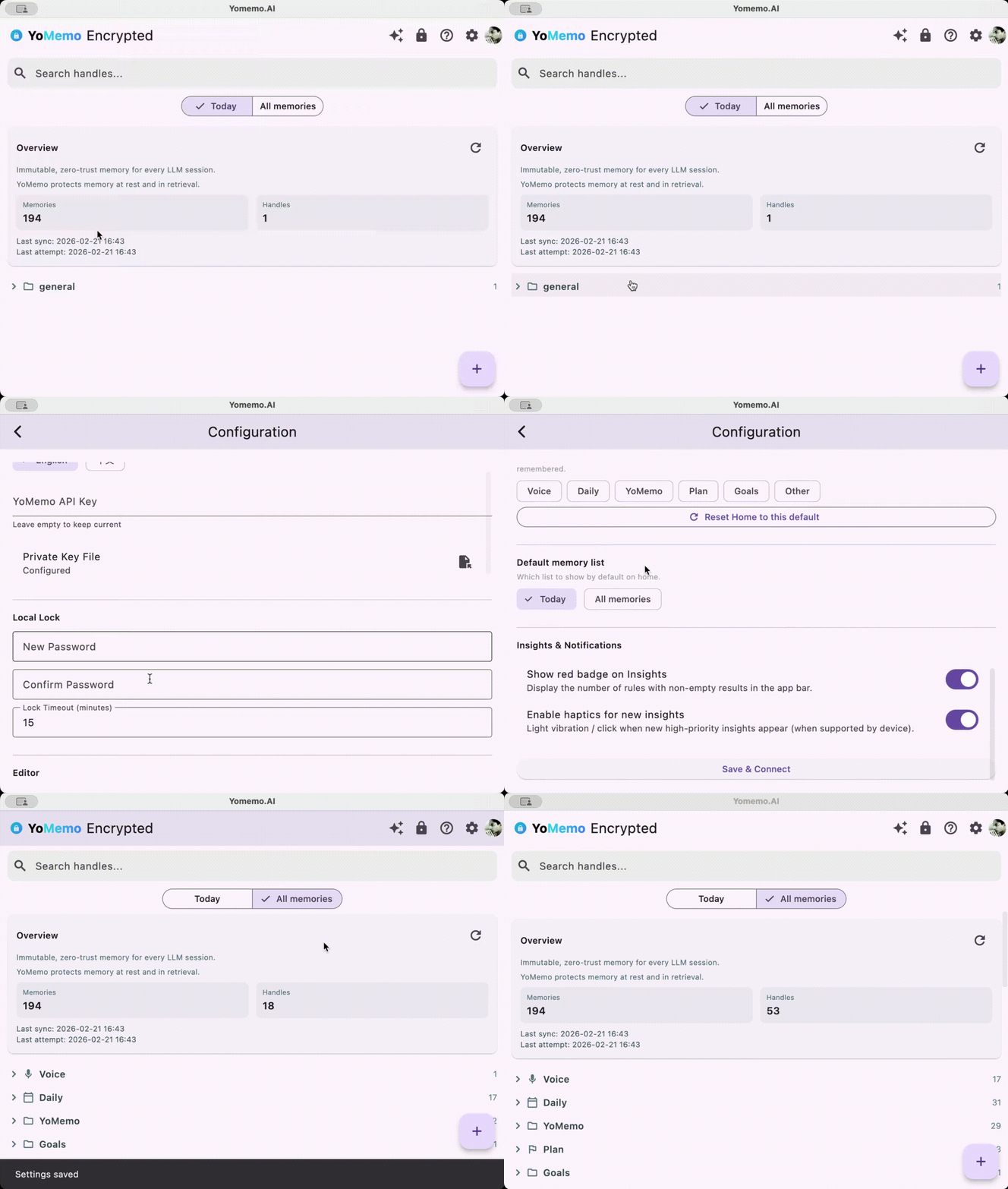
Home memory list: switch between “Today” and “All memories”
- A SegmentedButton below the search bar lets you switch between Today and All memories; default is Today.
- Today shows only memories created on the current day (local date); All memories matches the previous behavior.
- The selected mode is persisted and restored on the next launch.
Default list configurable in settings
- Configuration now includes Default memory list: choose whether the home screen opens with Today or All memories.
- Changes in settings apply when you return to Home.
Technical
: new,,; preference key(default).- “Today” uses local timezone; compares
date part to the current day. - i18n:
,,(en/zh).
February 20, 2026
2026-02-20
New
Memory deadtime (expiry)
- Memories can now have an optional expiry time via
(ISO 8601, e.g.). After that time, the memory is treated as expired and is excluded from default listing and MCP. - API and MCP default to returning only non-expired memories. Use the
option when you need to include expired ones. - Expired memories are automatically marked so they stay stored but no longer affect “active” context.
Dashboard: search memories
- Memories page now has a search bar to filter by description (substring, case-insensitive).
- Optional advanced search adds metadata key/value filters. Pagination resets to page 1 when search or filters change.
Improved
- Dashboard: Memories list shows expiry time (deadtime) when set and supports an optional “Show expired” toggle so you can review or clean up expired items.
February 19, 2026
2026-02-19
YoMemo Flutter Client v0.0.7
Features
- Multi-language support (i18n)
- Added English / 中文 language switching.
- All app UI strings are localized; language choice is persisted and applied on next launch.
- Language selector is available in Configuration (配置) at the top of the settings screen.
- Flutter client now uses flutter_localizations and ARB-based l10n (en + zh).
Improvements
- Handle categories and section titles (Voice, Daily, YoMemo, Plan, Goals, Other) are localized in list and settings.
- Export, lock, password setup, editor, insights, and memory detail screens use localized copy.
Technical
- New LocaleProvider with SharedPreferences for storing locale (en / zh).
- New lib/l10n/ with app_en.arb, app_zh.arb, and generated AppLocalizations classes.
February 7, 2026
2026-02-07
New
Insights (Pro)
Pro users get a new Insights page in the dashboard: E/L/A/P radar, handle distribution, memory spectrum, and balance suggestions (e.g. too many memories, too many handles, logic-heavy vs emotion-heavy).
E/L/A/P is explained in-product (Emotion, Logic, Abstraction, Pragmatism, 0–1). Non-Pro users see the Insights entry in the sidebar with a Pro badge and an upgrade CTA when they open the page.
YoMemo Client: voice input & delete
- Voice input: Speech-to-text in the editor (mic button) with improved interaction and delta handling for a smoother dictation experience.
- Delete: You can delete a single memory or all memories under a handle from the app (with confirmation).
Python MCP (yomemoai-mcp)
- load_memories upgrade: supports loading only part of your memories and lightweight modes to save tokens: mode=summary (default): description + metadata only, no content. mode=metadata: id, handle, created_at, metadata only. full: full decrypted content. Use with pagination (cursor + limit) to load in chunks.
Improved
Dashboard
- Insights is visible to all users in the sidebar; non-Pro see a Pro label and an upgrade prompt on the Insights page to encourage upgrades.
Product direction
- Main path is AI clients via MCP (one integration, memories shared across LLMs). Focus for early users: onboarding, feedback loop, and MCP-path stability.
Notes
- iOS App Intent / Siri save-memory and metadata-driven features (e.g. TTL) are planned and deferred for later.
- Memory capacity / ELAP visualization is positioned as a Pro SaaS differentiator.
February 2, 2026
2026-02-02
New
- YoMemo Official Client
- Introduced the YoMemo Official Client (Flutter): a free desktop and mobile app for managing encrypted memories.
- Features: hybrid encryption compatible with python-yomemo-mcp, local password lock with idle timeout, handle-based grouping and quick memory editing. Supports macOS, Windows, Linux, iOS, Android, and Web.
- Download: GitHub Releases
Improved
- Homepage
- Added a dedicated “YoMemo Official Client” section on the homepage (and nav link Client) to guide users to try the free client and download from GitHub.
- Dashboard
- Added a Download client link in the sidebar (with Docs) so logged-in users can quickly get the desktop client.
January 26, 2026
2026-01-26
New
- CLI integration (yomemo-cli)
- Added a CLI quick‑start in the “Integrate today” section so you can easily:
- Install the official
- Initialize your account locally
- Sync an Obsidian vault (or any Markdown folder) into encrypted YoMemo memories
- Install the official
- Added a CLI quick‑start in the “Integrate today” section so you can easily:
Improved
- Mobile dashboard experience
- Dashboard sidebar is now a slide‑in drawer on small screens, giving more space to view and manage memories on mobile.
Security & privacy
- Safer local note sync
- You can safely upload private notes (journals, medical records, etc.) via the CLI — content is encrypted client‑side before it reaches YoMemo.
- Reminder: file names are currently used in memory descriptions, so avoid putting sensitive information directly in filenames.
January 22, 2026
2026-01-22
Features
- Initial release with online public and private key generation
- MCP support for memory management
- First version launch
December 20, 2024
2024-12-20
新增功能
- 添加了 Changelogs 模块,用户可以查看开发过程
- 支持按日期自动读取和展示 changelog 文件
改进
- 优化了页面加载性能
- 改进了用户体验
修复
- 修复了一些已知问题